The teleprompter app made for Windows.
Pacedot is a free teleprompter for Windows 10 and 11. It floats over any app, stays hidden from screen sharing and recording, moves at your speaking pace, and gives you feedback on every take.
What a Windows teleprompter needs to do
A phone teleprompter only has to scroll text. On a PC, the prompter shares the screen with everything else you are doing: the call, the slides, the app you are demonstrating, the recorder. That changes what matters.
- Stay out of the capture. If the prompter shows up in your screen share or recording, it is useless for calls and tutorials.
- Stay on top. It has to float over Zoom, PowerPoint or your IDE without stealing focus.
- Sit near the camera. A small window just under your webcam keeps your eyes close to the lens.
- Keep pace with you. Fixed-speed scrolling makes you rush or wait. Voice pacing moves when you talk.
- Handle your language. Right-to-left scripts and accented characters should just work.
How Pacedot works on Windows
Pacedot is a desktop app for Windows 10 (version 2004 or later) and Windows 11. You write or paste a script, choose a style (social video, presentation or tutorial), and Pacedot marks it up with pauses, stressed words, pace changes, breaths and energy lifts. Then you either present live on a call or record inside Pacedot.
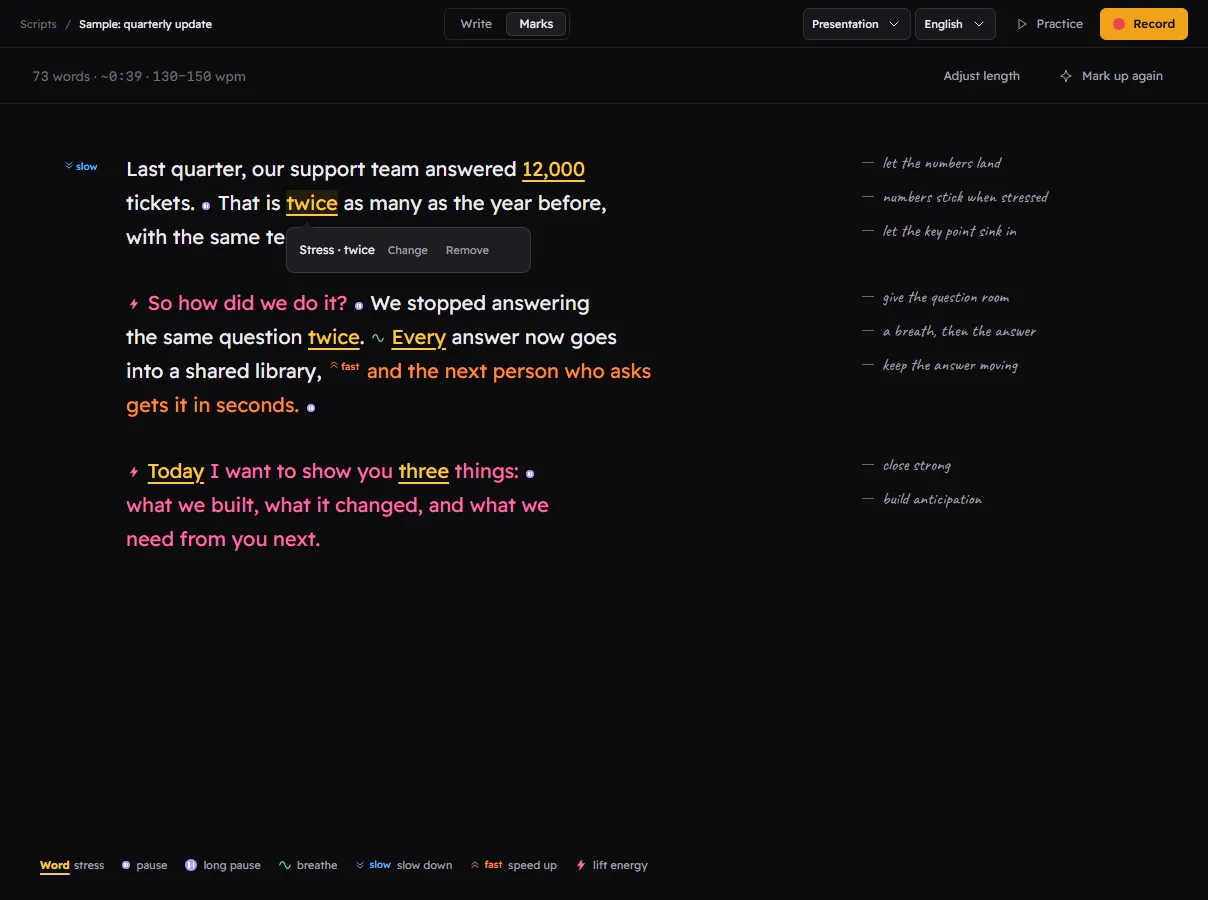
- Write or paste your script. Pacedot shows the word count and an estimated length at your target pace.
- Mark it up. On-device rules add marks for free. The AI director in Premium adds marks with a note on each one.
- Read. Open the prompter over any app, or record screen, camera, both, or voice only. The prompter is excluded from capture.
- Review. After a recorded take you get pace, pauses, fillers and skipped lines, plus an automatic cut and captions.
How the prompter stays invisible
Windows lets an app ask to be left out of screen captures. Pacedot uses that for the prompter, your notes and its controls. Anything that captures the screen through Windows (Zoom, Teams, OBS, browser screen sharing, Pacedot's own recorder) sees the windows behind the prompter instead. Older versions of Windows 10 do not support this, which is why Pacedot needs version 2004 or later.
Free and Premium
The prompter, voice pacing, recording, on-device cue marks, delivery feedback, automatic cuts and captions are free. Premium adds the AI director, removes the small export watermark, and unlocks 4K and full sound clean-up.
Last updated 2026-10-26
Questions
Does Pacedot work on Windows 10?
Do I need a second monitor?
Can I control it with the keyboard?
Keep reading
Read like a pro. Nobody sees the script.
Join the waitlist for the free beta on the Microsoft Store, and lock in the founding price before Premium launches.
Free during the beta. The first 500 sign-ups get Premium for $49 for the first year. One email when the beta opens, no spam. Privacy